
Buying guide · reviewed 21 October 2026
CNFans purchase guide: the deal you saw and the order you actually pay for
A low price in a listing is not yet a complete purchase cost. It may refer to one option, an account-specific coupon or a basket threshold. Work out the price the purchasing account can actually obtain before following the order through the warehouse and the separate international-shipping payment.
Prepare and pay for the purchase
Find the listing behind the advertised deal
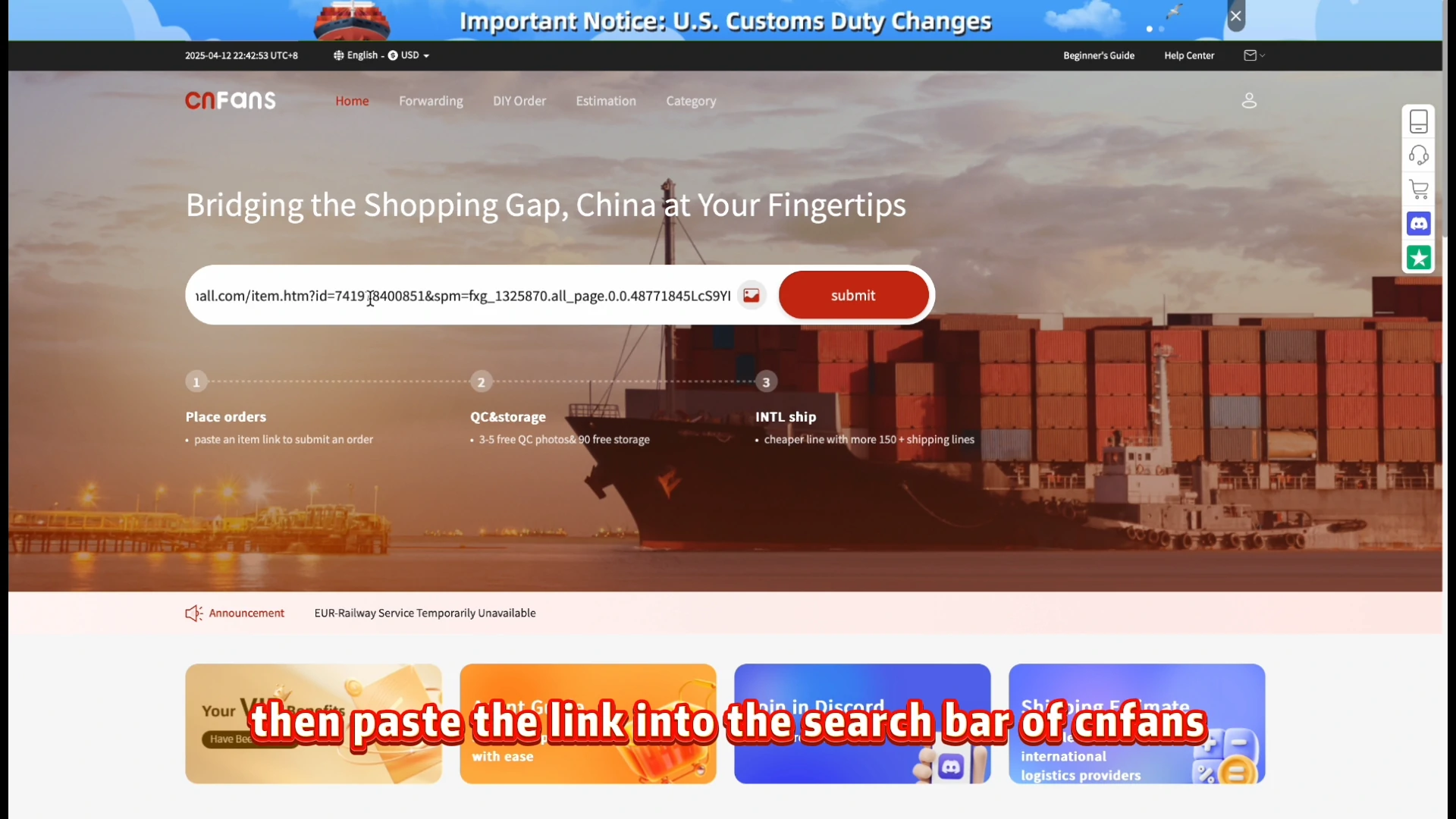
Browse a category or search for the product, then open its seller page. Save the product link and the offer wording you are relying on. A catalog card may show an old price or the cheapest option in a range. Copy the item URL into CNFans product search when service is available; do not substitute a campaign homepage for the actual product.
Select the option and identify the discount condition
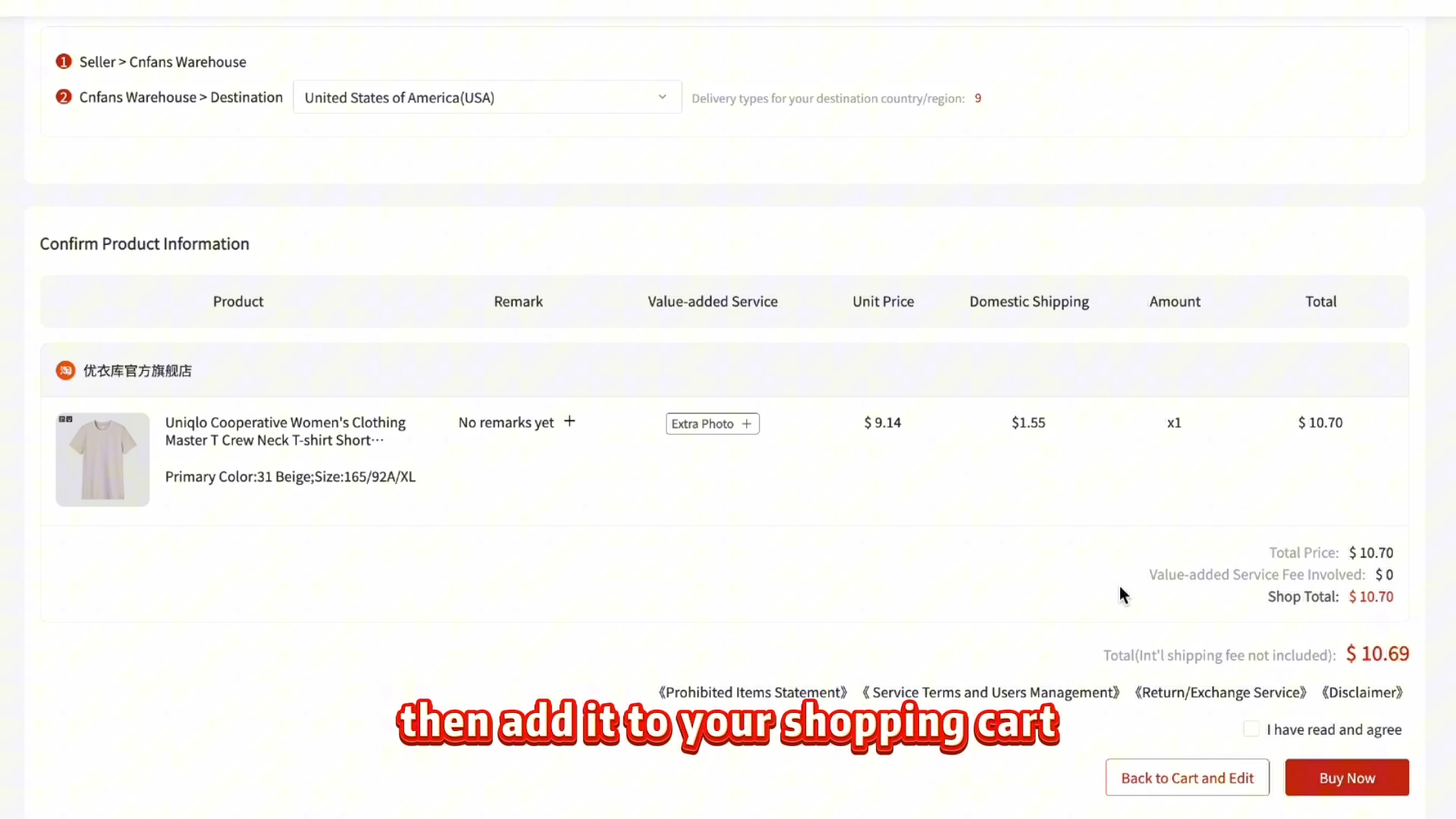
Choose a complete size, color, quantity and package specification. Check whether the displayed reduction needs a coupon, membership, app, account history or basket total. Ask whether the purchaser can meet that condition rather than assuming your personal entitlement transfers. The historical order-review image shows selected product information, not proof that any seller coupon has been applied.
Confirm the purchase amount before payment
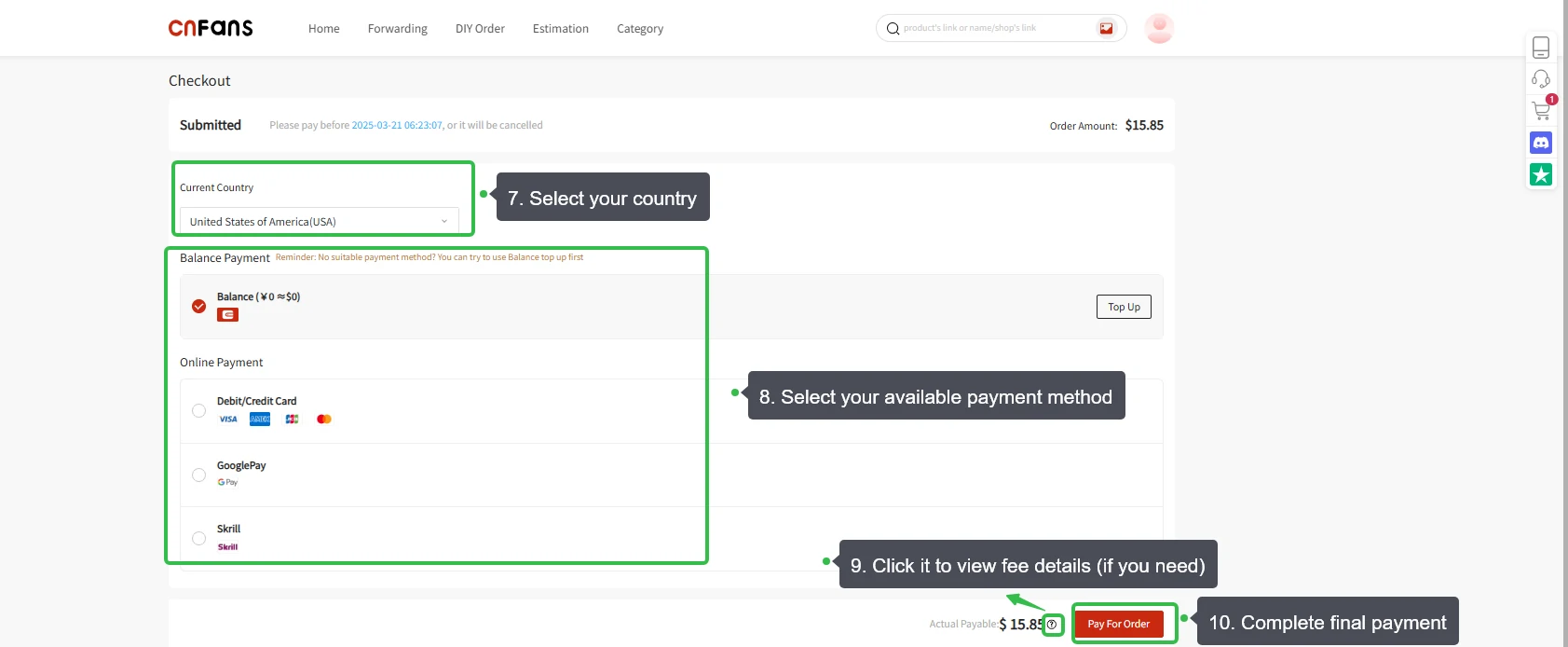
Review the amount for goods, domestic delivery and any applicable charges. Keep an agreed maximum purchase amount if a discount is uncertain. The first payment excludes the later international shipment, so a saving on the item is not the saving on the delivered order. Historic payment methods and example figures in the tutorial cannot establish the current checkout.
Purchase and warehouse
Let the agent confirm the real seller checkout
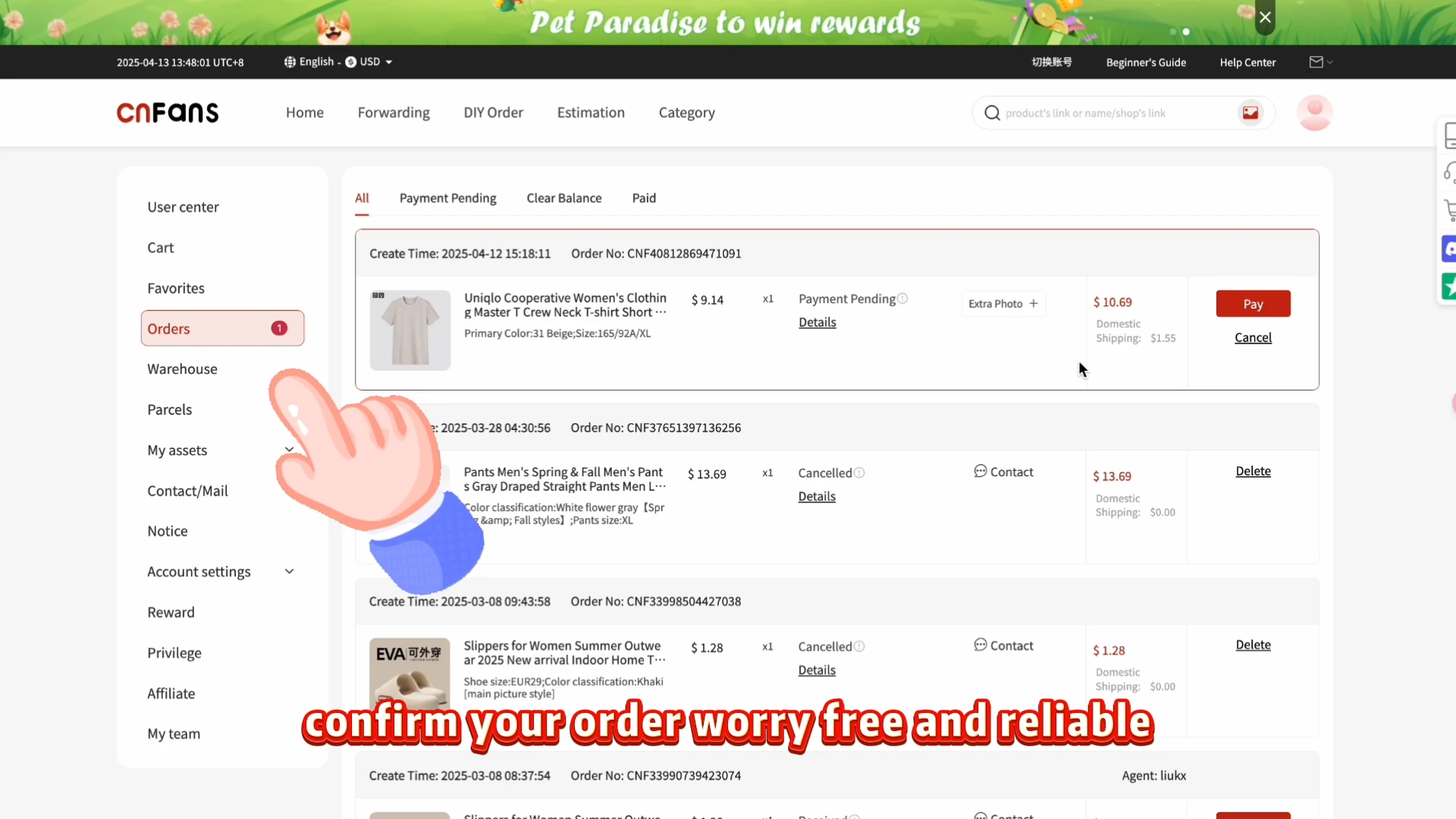
A paid request is followed by acceptance and purchase by the agent. The actual seller checkout may differ from the offer you saw. Read any price adjustment or stock message before approving it, and keep the response tied to the original item. The example Orders page shows pending/cancelled states; it is a place to check progress, not evidence a bargain was secured.
Track the seller’s domestic shipment
After the goods are purchased, the seller ships to the warehouse in China. Keep domestic delivery progress separate from international tracking. If a multi-piece offer becomes a partial purchase, ask how the price and quantity changed instead of assuming the original threshold still applies. Do not create a replacement order while the first one’s status is unresolved.
Check the item independently of the saving
Inspect the received variant, size, number of pieces and visible condition in the available QC pictures. A discount does not explain an undisclosed mismatch, and a warehouse photo cannot establish quality that is not visible. Ask a specific question before accepting the item if the evidence is incomplete. The historical QC interface is an example of where those images appear.
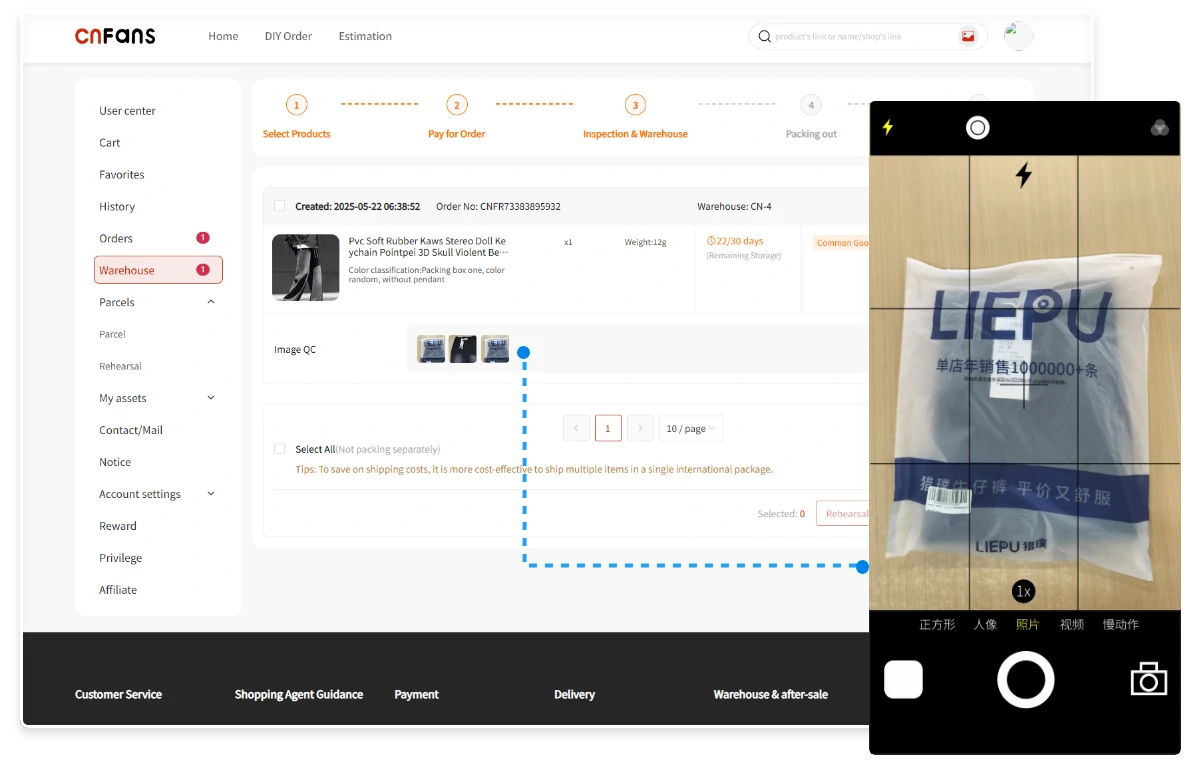
International parcel
Choose the goods for your international parcel
Select eligible items after resolving purchase discrepancies and checking storage status. Revisit whether all items are still useful: an extra piece added for a threshold may increase international weight. The illustrated Warehouse page includes an Expired item; resolve any such warning before relying on parcel submission. Packing several items together is a decision about the whole parcel.
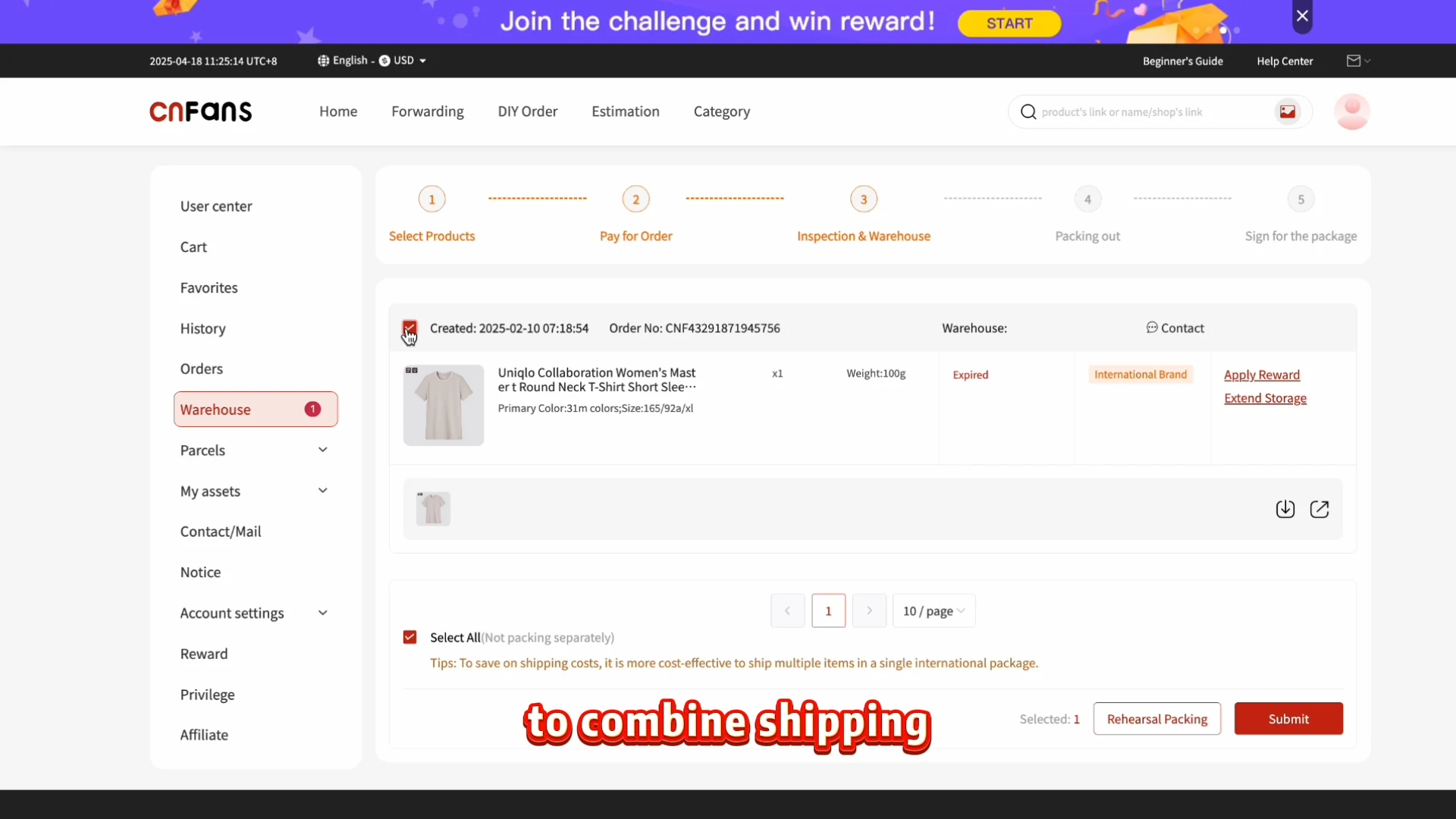
Compare total freight, then pay it separately
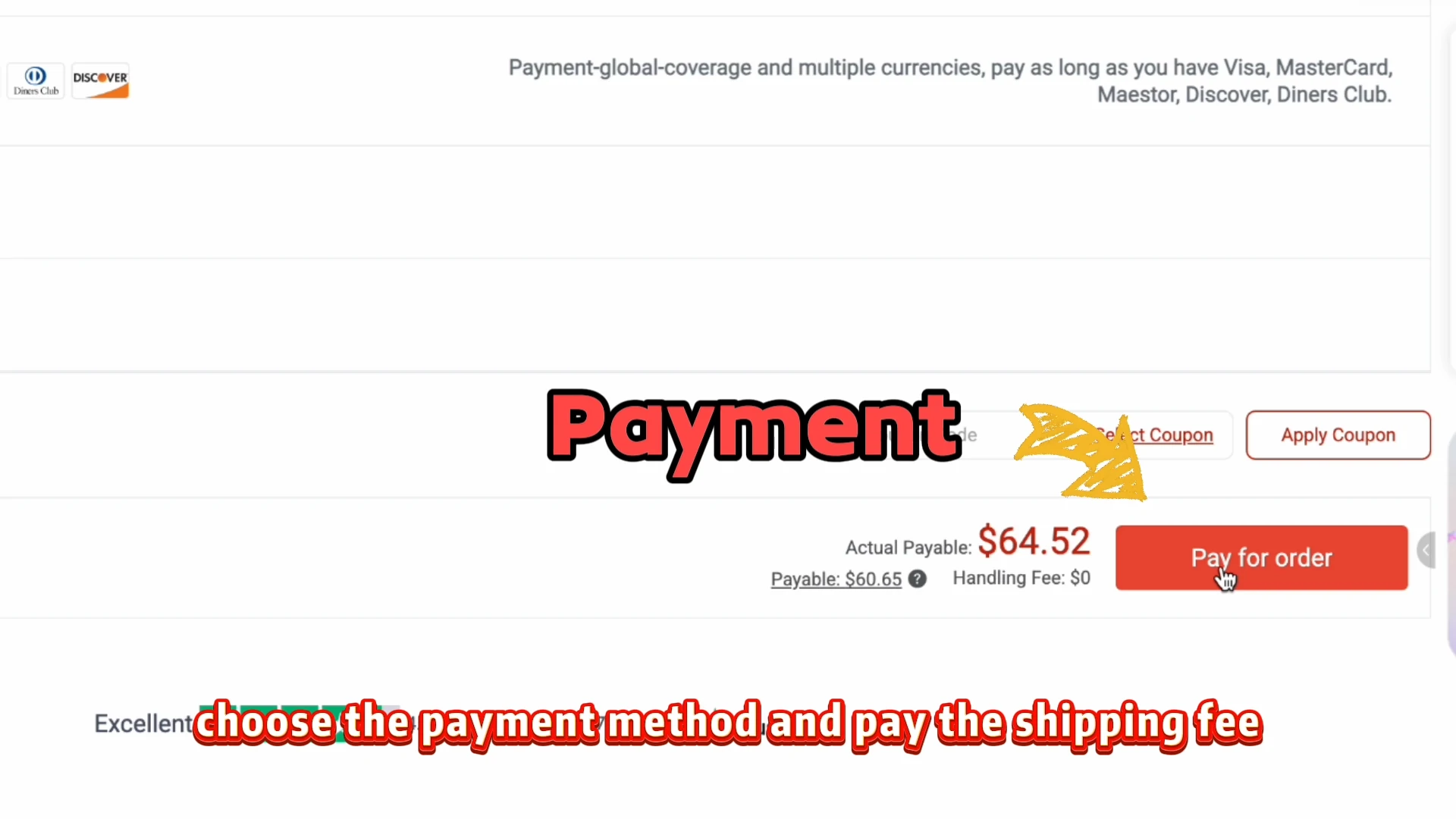
Compare routes on the same destination, contents and packing request. Include chargeable weight, packing services and any taxes or duties described for that route rather than subtracting a product discount from a guessed shipping figure. Pay international freight only after reviewing the quote. A coupon control in the historical freight screen does not prove that a marketplace coupon applies to shipping.
Track delivery and keep the financial records
Follow parcel preparation, dispatch and carrier scans. Keep the original offer, confirmed purchase amount, shipping payment and final contents together until the order is settled. If goods are missing or damaged at receipt, preserve packaging evidence and report the particular item and parcel references. Any refund or adjustment must be confirmed through the order’s actual after-sale process.
Watch the historical official tutorial
The video shows the interface of its time. Its prices, payment options, promotions and storage wording are historical examples, not current terms.
Open the video player
If the video does not load, follow the nine illustrated steps in this guide. They cover the complete workflow without depending on the player.
Questions before starting
Does a Spreadsheet sell the item?
It is a discovery catalog and guide. The seller supplies the listing and variant; the agent handles a purchase request when its service is available.
Does the first payment include international shipping?
Not in the documented historical workflow. Goods and domestic delivery are handled first; international freight is quoted and paid after the warehouse stage.
Does a QC photograph approve the product?
No. It shows visible evidence to compare with your chosen variant. Missing details need a specific question, and a photograph cannot prove every quality or authenticity claim.
Can I order while the site shows a maintenance notice?
This guide does not establish an available checkout. It documents the historical process; verify the current official service before paying.
What this Spreadsheet helps you decide
The discount sorter explains which offers normally need a question before payment. This walkthrough adds the rest of the journey: product selection, purchase status, QC, packing and delivery.
- Understand coupon conditions
- Check basket thresholds
- Read the purchase amount
- Ask a precise price question
Current listing details and order messages take priority over an old screenshot. Use the detailed guide and help pages for costs, QC questions, shipping and the decisions that need a response from the agent. Help and questions.
Turn an advertised saving into a confirmed purchase amount
The Spreadsheet is a discovery guide, not the party redeeming a marketplace coupon. The seller sets the offer; the purchasing account must meet its conditions; the agent handles your request when its service is available. Keep a screenshot of the promotion, but request the payable amount for your exact option and quantity before treating the saving as part of the budget.
| Amount | What to compare |
|---|---|
| Card or advertised price | Which option it belongs to and whether a coupon, account tier or minimum spend is assumed. |
| Seller checkout | The actual variant, quantity, domestic delivery and permitted discount. |
| Agent payment | The charged currency, conversion and separately displayed service or payment fees. |
| Delivered cost | International freight, approved packing services and applicable destination charges. |
A discount can disappear without making the item the wrong item. Decide your maximum acceptable total and whether to cancel or request approval if the confirmed amount exceeds it. An order note communicates that preference; it does not create a guarantee that the purchaser can meet a sale deadline.
Do not solve an unpaid display by paying twice
Use the order’s exact status rather than “I paid for the haul”. Payment matched to the platform is distinct from the seller purchase. If several finds are involved, a discount question on one line can remain unresolved while another line moves to the warehouse. Ask what the next action is for the affected item.
For a cancellation, separate purchase refund, credit in the platform balance, withdrawal and the bank’s settlement. Keep the approved refund amount next to each event. A shortfall may involve a different charge or an unfinished stage; ask for an itemised explanation rather than assuming it is a coupon adjustment.
A cheaper order needs the same warehouse decision
Match the received item to the original option, quantity and disclosed condition. A discount does not by itself mean “no returns”, and a full price does not guarantee that every remedy is available. Ask for the terms applying to that item. Describe a wrong variant, missing piece or visible defect precisely and retain the supporting pictures.
If QC pictures do not answer the question, ask for a specific view or measurement and its cost. GL/RL is informal shorthand, not an authorised acceptance or refund. Check storage and return deadlines separately before waiting for another discounted item or submitting a parcel.
Keep the same contents and packing when comparing two route quotes. Read coverage and excluded goods, then keep the final quote with the receipt. A historic freight screenshot is not a current rate card.
Choose information you can check without trusting a sales pitch
Velvet Rope separates the price visible in an advert from the price an account can actually pay. Use its examples to identify conditions, then inspect the live seller offer. A good Spreadsheet shows the source listing, a date and its referral interests; it should not promise a coupon merely because a card displays one. A useful seller answers which option and condition the quoted price covers.
CNFans’ documented role was purchasing and forwarding. Choose it only when current access, applicable terms and support are verifiable. When comparing Superbuy, CSSBuy or another service, request the same item and delivery scenario and compare the payable total, not just a commission headline. This guide provides no current ranking or fee guarantee.
Check promotions and service announcements on the current official domain. Individual Reddit payment and freight reports illustrate questions to ask, not the likelihood of a problem or a refund promise. They were reviewed on 22 October 2026; orders and employee identities were not authenticated, and no verified Discord commentary is used.